The ROI of Using an On-Premises ERP vs SaaS ERP
Published:
Last Updated:
Retailers adopting cloud-based ERP systems report implementation timelines that are up to 3–4 times faster than on-premises deployments, enabling quicker entry into new markets and channels.
As retail complexity skyrockets (think thousands of SKUs, multi-location inventory, and real-time demand signals), the way you deploy your ERP can directly impact speed, scalability, and profitability.
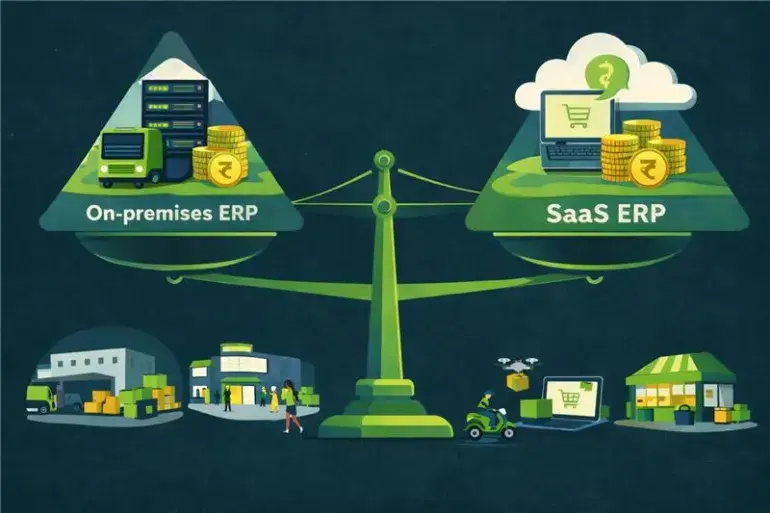
The choice between on-premises and SaaS ERP is a significant strategic decision that shapes cost structures, operational agility, and long-term ROI. In this blog, we break down the trade-offs between these two models, explore their impact on retail growth, and show how a modern ERP can deliver flexibility across on-premises, cloud, or hybrid deployments.
What are On-Premises ERP and SaaS ERP
On-Premises ERP: Full Control, Higher Ownership Costs
On-premises ERP runs on infrastructure you own and manage. This model gives you complete control over data governance, security protocols, and system customization. It’s ideal for businesses with strict compliance requirements or highly tailored workflows.
However, it comes with higher upfront capital expenditure, ongoing maintenance responsibilities, and longer deployment timelines.
SaaS ERP: Cloud-Delivered, Subscription-Based Agility
SaaS ERP is hosted by the vendor or a cloud provider and accessed via the internet. You pay on a subscription basis, typically per user, per module, or per term, while the provider manages infrastructure, updates, and security.
SaaS ERP solutions may run either on a multi-tenant cloud or a single-tenant cloud, depending on vendor architecture and your compliance or customization needs.
This model offers faster implementation, lower initial investment, and scalability as your business grows. It’s suited for retailers seeking predictable costs, rapid onboarding, and the ability to flex resources without heavy IT overhead.
On-Premises ERP vs SaaS ERP: Key Differences
- Cost Structure: Deploying on-premises typically involves significant upfront CapEx for hardware, licenses, and implementation. In contrast, SaaS converts this into predictable OpEx through a subscription model.
- Maintenance Responsibility: With an on-premises setup, your IT team handles updates, patches, backups, and infrastructure upkeep. SaaS shifts these tasks to the vendor, reducing internal resource load.
- Control & Customization: On-premises environments allow complete control over data, security, and deep customization. SaaS prioritizes standardization and ease of upgrades, offering configuration flexibility but limited bespoke development.
- Access & Agility: SaaS enables remote access, multi-location support, and rapid deployment. On-premises solutions require physical infrastructure and longer planning cycles, which can limit scalability.

Running retail + e-commerce together? Get a live walkthrough of Ginesys One, a unified suite for omnichannel operations.
Investment Breakdown: CapEx vs Subscription
On-Premises ERP: The Upfront CapEx Commitment
Implementing on-premises ERP typically involves:
- Buying software licenses for the ERP modules.
- Procuring server hardware, storage, networking equipment, data center or server-room setup.
- Infrastructure setup and configuration: installation, customizations, integrations with legacy systems, custom workflows, etc.
- Possibly hiring or deploying an in-house IT team to operate and maintain the system, handle backups, support, and security.
These upfront investments (license + hardware + implementation + IT setup) can be significant and may deter smaller or growth-stage businesses from choosing on-premises ERP.
SaaS ERP: Subscription-Based, Lower Upfront Cost
With SaaS you typically pay:
- A subscription fee, often based on the number of users, modules, or usage.
- Minimal or no hardware/infrastructure investment as the ERP vendor already runs the servers and maintains the data center.
- Implementation/configuration fees, though typically lower than on-premises because there is no hardware deployment, and basic installation steps are skipped.
- Ongoing costs bundled into subscription: hosting, maintenance, backups, support, updates.
This shift from CapEx to OpEx has important implications for cash flow, budgeting, and the ease with which growing retailers can adopt ERP. Instead of a large, upfront capital outlay, they get predictable monthly or yearly expenses.
Add-on Costs of SaaS ERP
While SaaS ERP reduces entry barriers, there can be other costs. Businesses should also watch for:
- Add-on fees for premium support, extra storage, add-on modules, advanced features or premium modules.
- Incremental costs as the business grows (per user, per module, per storage, per transaction). SaaS costs can scale and sometimes escalate as usage grows.
- Potential costs for data migration, integration with other systems (POS, inventory management, CRM), and customizations.
- Evaluating ROI for SaaS ERP needs a careful assessment of baseline subscription cost plus likely growth-driven add-ons over time.
Implementation, Scalability & Flexibility
One of the most critical yet often overlooked determinants of ROI is how soon the ERP starts delivering business value and how it adapts as the business evolves.
Implementation Speed & Time to Value
- SaaS ERP: Because infrastructure is pre-existing and managed by the vendor, SaaS ERP typically deploys much faster. A commonly cited benchmark is 3–6 months for cloud ERP vs 12 months or more for on-premises.
- On-Premises ERP: Implementing from scratch involves hardware procurement, server installation, network configuration, extensive customization or integration, internal approvals, all of which take time.
In many cases, the faster deployment of SaaS ERP translates into earlier business benefits, with improved inventory visibility, better order management, real-time data flow, which accelerates ROI, especially for growing retailers or businesses opening new stores quickly.
Scalability & Growth Flexibility
- SaaS ERP: Scales easily. As your business grows, with new stores, more users, and expanded inventory lines, you can simply add more user licenses, storage or modules. There’s no need to invest in new hardware.
- On-Premises ERP: Scaling usually means buying more servers, storage, networking, and possibly data-center expansion. This is capital-intensive, time-consuming, and involves risks such as hardware compatibility, network load, or maintenance.
For retailers with unpredictable growth due to rapid store expansion, seasonal peaks, or fluctuating inventory levels, SaaS offers flexibility and elasticity. On-premises ERP may be suitable for businesses with stable scale, predictable growth, and the capital to invest.
Planning expansion or new store launches? Discover how Ginesys’ modular ERP + cloud deployment helps scale fast with predictable cost.
Ongoing Costs: Maintenance, Upgrades & Total Cost of Ownership (TCO)
Long-term ROI depends heavily on ongoing costs. A rigorous comparison must consider the Total Cost of Ownership (TCO) i.e. infrastructure, staffing, upgrades, maintenance, support, downtime, etc.
On-Premises ERP: Maintenance Burden & Hidden Cost
With on-premises ERP, the costs don’t end at implementation. Ongoing expenses tend to be significant and recurring:
- In-house or outsourced IT staff for server maintenance, backups, network management, security, database administration.
- Periodic hardware refresh or upgrades: server’s age, capacity grows, load increases. That may require new purchases, data migration, downtime, and risk.
- Software license renewal, support contracts, patches, compliance, audits especially if your industry is regulated.
- Opportunity costs: Time spent on maintenance and troubleshooting rather than strategic, value-adding tasks. Manual upgrades, re-customizations, integration challenges, all contribute to non-obvious overhead.
Because of such costs, the perceived lower recurring cost after license purchase of on-premises ERP often hides a complex web of ongoing expenditures, making true TCO significantly higher than the initial CapEx.
SaaS ERP: Included Maintenance, Upgrades, and Lower Hidden Costs
With SaaS ERP, many of those recurring burdens are handled by the vendor:
- Automatic updates and upgrades. Vendor rolls out new versions, patches, security updates, without requiring downtime or manual patching.
- Backups, disaster recovery, data center redundancy, compliance standards handled by vendor.
- Minimal internal IT staffing is needed. Instead of managing servers, your team focuses on business operations, analytics, and growth.
- Predictable budgeting. Subscription fees offer clarity and consistency, making long-term financial planning easier.
Putting it Together: TCO + ROI
When you build a holistic TCO model, including hardware, licenses, IT staffing, maintenance, upgrades, backups, risks, and opportunity costs, the balance often tilts in favor of SaaS for small- to mid-sized businesses, retailers with multiple locations, or companies in growth phase. It is also important to note that downtime risk is mostly higher in on-prem (due to hardware failure) than in SaaS.
Meanwhile, on-premises may only start to make sense for large enterprises with stable scale, deep IT capabilities, and the need for heavy customization or strict data sovereignty.
But TCO isn’t just about cost. It's about when and how the system delivers value, which brings us to the next consideration.
Security, Compliance & Customization Trade-offs
Data Security & Compliance: Control vs. Vendor Expertise
On-Premises ERP gives you full control over data, security protocols, backup routines, physical access, and compliance, which is often important for businesses in regulated industries, or with sensitive inventory/customer/financial data.
Also, on-premises ERP doesn’t rely on internet connectivity for operations. This means you’re insulated from connectivity issues, data sovereignty concerns, and third-party downtime.
SaaS ERP, however, offers data security backed by vendor investments. Most leading cloud ERP providers implement strong security measures such as encryption, access controls, redundant data centers, backups, and disaster recovery.
For many businesses, vendor-managed security is more robust and professionally maintained than what an internal IT team could realistically sustain. On top of that, compliance may be handled via vendor certifications, rather than each company managing compliance protocols internally.
Customization & Integration: Flexibility vs Standardization
- One of the strong arguments for on-premises ERP is extensive customization. Companies with complex or unique retail workflows can tailor an on-premises ERP to their exact needs.
- On the flip side, SaaS ERP offers reliable APIs and event mechanisms to match many business needs, but deep custom coding, bespoke modules or unusual integrations may be via third-party extensions.
For businesses with standard retail workflows, SaaS ERP’s configurability, combined with its ease of integration with external tools, can deliver high value with minimal complexity. For those with complex or unique legacy environments, on-premises remains compelling.

Performance, Accessibility & Long-Term ROI Analysis
Performance & Accessibility
Because it's internet-based and vendor-hosted, users can access SaaS ERP modules from anywhere using laptops, tablets, and mobile devices.
Additionally, cloud providers often guarantee high availability and uptime (sometimes > 99.5%), with redundant infrastructure, failover mechanisms, data backups and disaster recovery.
On-Premises ERP, while offering possibly faster local performance, can suffer from limited remote accessibility unless you build VPNs or remote-access infrastructure. This can restrict mobility, especially for multi-store retailers or businesses with remote teams.
Moreover, scaling or handling traffic spikes may require hardware upgrades, which introduces latency, downtime, or performance delays. SaaS often handles spikes gracefully with elastic resource provisioning.
Long-Term ROI: Modeling over 3-5/10 Years
To assess long-term ROI, companies should model total costs and benefits over a multi-year horizon (3, 5 or 10 years), factoring in:
- Initial costs: Hardware, licenses, implementation
- Ongoing costs: Maintenance, upgrades, IT staffing, electricity, cooling, hardware refresh
- Operational value delivered: Improved efficiency, better inventory management, real-time data, faster decision-making, reduced manual work, compliance, reduced downtime
- Opportunity costs: Internal IT time diverted from strategic to maintenance tasks, cost of outages, manual reconciliation, data silos
- Flexibility and scalability benefits: Ability to open new stores, onboard new users quickly, adjust modules per need
Industry studies show that cloud (SaaS) ERP delivers significantly lower total cost of ownership (TCO) compared to on-premises ERP over the long term.
In some contexts, especially large enterprises with stable user bases, predictable growth, strong IT infrastructure, and deep custom requirements, on-premises ERP may offer better ROI over the very long term, particularly if hardware and software are amortized over many years.
The break-even point depends heavily on business size, growth trajectory, complexity of operations, and IT maturity.
Switching from spreadsheets or legacy systems? Explore how Ginesys OMS can unify your order, stock and fulfilment workflows seamlessly.
Selecting the Right ERP Model for Retail Growth
Decision-makers choosing an ERP deployment should consider their business context, strategic goals, and growth trajectory. Use these guidelines to pick the model that fits best.
On-Premises or Private Cloud is Best If
- You already have capable IT infrastructure and staff.
- Your workflows or integrations are complex or highly customized.
- Data security sovereignty is not critical.
- Your operations are stable, and you can amortize hardware and license costs over time.
SaaS ERP Makes Sense When
- You are a rapidly expanding chain with limited capital and lean IT support.
- You expect fast growth, adding stores or regions, and need to scale quickly.
- You value speedy deployment, predictable costs, minimal maintenance, and reduced IT burden.
- Flexibility, modularity, and avoiding infrastructure hassles matter most.
Always Begin with a ROI-Driven Assessment
Build a financial model that includes license and hardware costs, implementation, ongoing maintenance, staffing, upgrades, plus expected business benefits such as efficiency gains, fewer errors, faster go-to-market, and better insights. Then layer in your growth forecasts, store expansion plans, user growth, and integration needs. Make your ERP choice based on clear numbers.
Ginesys: Strategic ERP Deployment for Sustained Retail ROI
Ginesys goes beyond generic ERP by delivering a unified, retail-first ecosystem designed for omnichannel growth in India. Whether you prefer cloud, hosted, or hybrid setups, Ginesys combines flexibility with deep retail functionality, ensuring faster implementation, lower overhead, and actionable insights.
- Cloud-First ERP & Hosted Infrastructure: Through Ginesys One suite, Ginesys offers a cloud-based ERP, POS, OMS and BI stack out-of-the-box, which removes the need for your own IT infrastructure and ensures zero infrastructure maintenance overhead.
- Secured Hosting: Ginesys provisions and maintains the cloud infrastructure (VMs, storage, security, backups), letting retailers focus on business rather than servers or maintenance.
- Modular, Retail-Tailored Stack: The suite covers ERP, desktop and web/mobile POS, OMS for e-commerce, tax/GST compliance, and BI so you can pay only for needed modules.
- Unified Data & Analytics via Data Lake + BI: Ginesys centralises data from POS, online and offline sales, inventory, orders, and customer data, and delivers real-time insights and analytics, helping optimize inventory, sales and operations.

Worried about data security, compliance or on-premises control? Schedule a discussion on on-premises deployment of Ginesys ERP and safeguard your data.
The current winner in the on-premises vs SaaS ERP debate is SaaS but each model offers a distinct ROI profile:
- On-premises: High upfront cost, full control, deep customization, stable long-term asset.
- SaaS: Low entry cost, predictable OpEx, scalability, minimal maintenance, rapid deployment.
What ultimately matters is your business strategy, growth plan, IT maturity, and operational priorities. A model that works for a large, traditional enterprise may be an overkill for a fast-growing retail chain. Conversely, a lean SaaS-only ERP may restrict a complex business with bespoke workflows.
If you run a multi-store, omnichannel retail business and want to maximize ROI while maintaining control and scalability, a flexible ERP solution that supports on-premises, cloud, and hybrid deployment can give you the best of all worlds.
Ready to find out which ERP deployment model fits your retail business best? Book a demo with Ginesys now.
FAQ
1. What exactly counts in TCO for both on-premises and SaaS ERP?
On-premises TCO covers licenses, hardware, infrastructure, IT staff, maintenance, and downtime costs. SaaS TCO includes subscription fees, implementation, add-ons, storage, and integration expenses.
2. How long does it typically take to see ROI for SaaS vs. on-premises ERP?
SaaS ERP usually delivers ROI faster (3–6 months) due to quick deployment and early operational gains. On-premises ERP often takes a year or more because of higher upfront costs and longer implementation cycles.
3. Can you switch from SaaS to on-premises ERP (or vice versa) without losing data or value?
Yes, with proper migration planning, backups, and vendor support. However, expect downtime, reconfiguration, and retraining during the transition.
4. How do data security responsibilities change based on ERP deployment model?
On-premises ERP puts full security responsibility on your team, including compliance and disaster recovery. SaaS shifts infrastructure security to the vendor, but you remain accountable for user access and governance.