Things Retailers should look at for while choosing a POS system

Published:
Last Updated:
In today's day and age, every retailer understands the importance of having a Retail Point-of-Sales (POS) system incorporated into their business. However, the main problem that retailers face is the daunting task of choosing the right Point-of-Sale system for their respective business. With the rapid evolution of retail technology, the number of POS solutions available in the market has grown significantly, making the decision-making process even more complex.
A POS system is no longer just a billing tool it has evolved into the central nervous system of a retail business. From managing transactions and inventory to enabling omnichannel experiences and providing business insights, modern POS solutions play a crucial role in determining the efficiency and scalability of retail operations.
To add to this, the implementation of a Retail POS software for small businesses requires investment not just in software, but also in hardware, training, and process changes. While earlier this investment was seen as a barrier, today it is viewed more as a strategic decision that directly impacts growth, customer experience, and operational control.
Retailers today operate in a highly competitive and dynamic environment. Customers expect seamless shopping experiences, whether they are purchasing in-store, online, or through mobile devices. They demand faster checkouts, multiple payment options, personalized interactions, and consistent service across channels. A well-chosen POS system enables retailers to meet these expectations effectively.
Hence, it is important that retailers choose the right POS solution for their business, which is why we have decided to lend a helping hand by shedding light on the main features that retailers need to look out for while choosing a new POS solution.
When Should a Retailer Upgrade or Replace an Existing POS System?
A retailer should upgrade or replace an existing POS system when their legacy infrastructure fails to support cloud access, mobile payments, real-time analytics, or omnichannel synchronization. Outdated systems create data silos and limit operational growth.
Many legacy POS systems are built on outdated technology that may not support modern retail requirements such as cloud access, mobile payments, real-time analytics, or omnichannel integration. Even if updates are available, they may only provide incremental improvements rather than a complete transformation.
Another common issue is vendor dependency. In some cases, software providers may discontinue support for older systems, leaving retailers with limited options. Updates may be delayed, incomplete, or incompatible with newer technologies, creating operational inefficiencies.
This leaves retailers with only one viable option choosing a new POS software that aligns with current and future business needs.
The first thing that retailers need to take into consideration is leaving out those vendors who have previously failed to provide adequate support or innovation. Reliability, long-term commitment, and continuous product development are key factors when selecting a technology partner.
Now that we have established a scenario for why you might have to look for another POS software, here are some things that retailers especially small and growing businesses need to look out for while choosing a Point-of-Sale system.
How Do You Identify Your Core Retail POS Requirements?
To identify core retail POS requirements, a business must analyze its storefront workflows, multi-location layout, inventory complexity, and digital e-commerce expansion plans. Mapping these workflows ensures you choose a system tailored to your exact operational scale.
POS systems today offer numerous functions, and while many of them are valuable, not all are necessary at the initial stage of a business. One of the most common mistakes retailers make is choosing a system with features they do not immediately need, leading to unnecessary complexity and costs.
The first step is for retailers to take a detailed and honest look at how they currently conduct business and where they see their business in the future. This involves analyzing workflows, customer interactions, inventory management practices, and operational challenges.
For example:
- Are you running a single store or multiple outlets?
- Do you plan to expand into e-commerce or marketplaces?
- How complex is your inventory?
- Do you need customer loyalty programs or advanced analytics?
Answering these questions helps identify the core requirements of your POS system.
Clarification of requirements is essential while choosing a new POS system, as it helps avoid unnecessary development efforts and ensures that the system aligns with business goals. At the same time, it is important to choose a solution that can evolve with your business.
Modern retail platforms often provide modular solutions, where retailers can start with basic functionalities and add advanced features such as analytics, omnichannel integration, or compliance tools as their business grows.
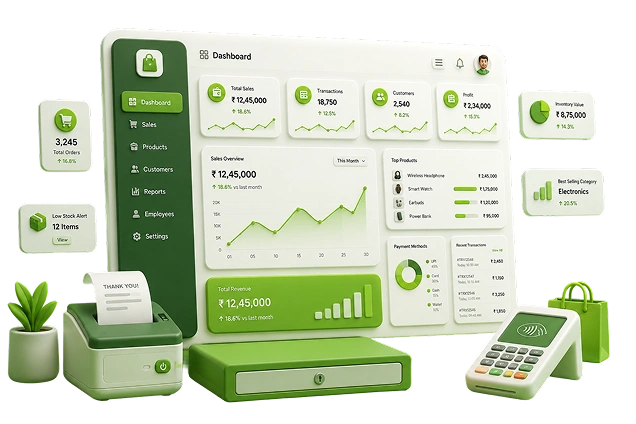
Evaluate your storefront requirements and choose the perfect system for your retail business.
Why Are Expandability and Scalability Crucial in a New POS System?
Expandability and scalability are crucial because a POS system must accommodate multi-store additions, global pricing updates, and new online marketplace integrations without disrupting ongoing storefront transactions. It acts as an operational enabler for long-term expansion. Small businesses often operate with a flat hierarchy, which allows them to react quickly to market changes. However, this agility must be supported by the technology they use.
A POS system should not limit business growth. Instead, it should act as an enabler, allowing retailers to scale operations without disruption. Whether it is opening new stores, adding new product lines, or expanding into online sales, the POS system should be flexible enough to accommodate these changes.
Scalability is particularly important in today's omnichannel retail environment. Businesses often start with a physical store and gradually expand to online platforms, marketplaces, and mobile commerce. A scalable POS system can integrate with these channels, ensuring a seamless transition.
Retailers should look for systems that:
- Support multi-store operations
- Allow centralized management of inventory and pricing
- Enable user role management for growing teams
- Offer cloud-based access for remote management
Solutions that are designed as part of a larger retail ecosystem integrating POS with ERP, order management, and analytics provide a strong foundation for growth.
What Back-Office Functionalities Should a Complete POS System Provide?
A complete POS system must provide robust back-office functionalities including centralized inventory management, financial reporting, supplier tracking, customer relationship management, and tax compliance automation. Unifying front-end and back-office data eliminates manual entry errors and structural inefficiencies. Many small retailers initially opt for standalone or disparate systems because of their lower upfront costs. However, these systems often lead to inefficiencies in the long run.
When different functions such as billing, inventory, accounting, and reporting are managed through separate systems, it creates data silos. This leads to duplication of work, inconsistencies in data, and difficulty in generating accurate reports.
A comprehensive POS solution integrates front-end operations with back-office functionalities. This includes:
- Inventory management
- Purchase and supplier management
- Financial tracking and reporting
- Customer data management
- Tax and compliance handling
Integrated systems ensure that data flows seamlessly across departments, providing a unified view of the business.
In today's retail landscape, businesses benefit significantly from platforms that combine POS with Retail ERP capabilities, order management systems, and analytics tools. This integration reduces operational complexity and improves decision-making.

Streamline your backend inventory tracking and eliminate data silos effortlessly.
What Hardware Factors Must Retailers Consider for a POS Setup?
Retailers must consider hardware compatibility, speed, durability, and form factor, ensuring that billing terminals, barcode scanners, receipt printers, and mobile devices integrate seamlessly with the POS software.
Retailers must consider the cost and compatibility of hardware such as:
- Billing terminals
- Barcode scanners
- Receipt printers
- Cash drawers
- Mobile POS devices
In modern retail, there is also a growing shift toward mobile and tablet-based POS systems. These devices offer greater flexibility, enabling staff to assist customers anywhere in the store, reduce queues, and improve service efficiency.
Hardware selection should be aligned with the business model. For example, high-volume stores may require robust and high-speed billing systems, while boutique stores may benefit from compact and mobile solutions.
Additionally, retailers should ensure that the hardware is durable, easy to maintain, and compatible with future software upgrades.
Which Future Retail Trends Should Your POS Software Support?
Your POS software must support emerging retail trends such as contactless digital payments, omnichannel fulfillment models, automated AI demand forecasting, and cloud-based data tracking.
Digital Payments: Customers expect seamless checkout options via UPI, mobile wallets, and contactless cards.
Omnichannel Fulfillment: Features like click-and-collect (BOPIS), ship-from-store, and unified returns require a POS that integrates with order management platforms.
Cloud Technology: Cloud POS systems offer remote access, automatic updates, and cost-effective scaling, making them ideal for modern brands.
Business Intelligence: Retailers need real-time data insights into sales, inventory velocity, and customer behavior to make proactive decisions.

Bridge the gap between your physical counters and digital e-commerce channels seamlessly.
How Do Ginesys POS and Zwing POS Optimize Enterprise Operations?
Ginesys POS provides enterprise-grade desktop billing stability for high-volume stores, while Zwing POS offers a cloud-first, mobile framework for agile, omnichannel storefront setups. Both operate within a unified retail ecosystem to ensure a single source of truth.
Choosing the Right POS Ecosystem
While evaluating POS systems based on features, scalability, and hardware, retailers today must also consider whether the POS solution fits into a larger, integrated retail ecosystem. Modern retail operations are no longer siloed billing, inventory, order management, analytics, and compliance must all work together seamlessly.
This is where unified platforms such as Ginesys One bring significant advantages, as they combine POS, ERP, order management, and analytics into a single connected system. Ginesys One enables retailers to operate across offline and online channels with a single source of truth, improving efficiency and reducing operational complexity.
Benefits of Ginesys POS
When retailers are looking for a robust, enterprise-grade POS system, solutions like Ginesys POS offer several advantages, especially for businesses operating multiple stores or high-volume billing counters.
One of the key benefits is reliability and performance. Being a desktop-based POS, it is designed for environments where stability and speed are critical such as large-format retail stores, supermarkets, and high-footfall outlets. It ensures uninterrupted billing even in scenarios with limited internet connectivity.
Another important advantage is its deep integration with backend systems. Ginesys POS works seamlessly with ERP systems, enabling real-time synchronization of inventory, pricing, promotions, and customer data. This eliminates data silos and ensures that all departments operate with consistent information.
Retailers also benefit from:
- Centralized control over stores, users, and pricing
- Faster billing with barcode scanning and optimized UI
- Strong support for complex retail operations (returns, exchanges, multi-store transfers)
- Ability to handle high transaction volumes efficiently
Additionally, Ginesys POS is designed to support both front-end and back-office operations, making it more than just a billing tool. For retailers planning long-term growth, this kind of stability and integration is crucial.
Benefits of Zwing POS (Cloud & Mobile POS for Agility)
For retailers who need flexibility, mobility, and faster deployment, Zwing POS offers a modern alternative.
Zwing POS is a cloud-first POS system that can run on web browsers, tablets, or mobile devices. This makes it ideal for:
- Small and mid-sized retailers
- Pop-up stores or kiosks
- Retailers adopting omnichannel strategies
- Businesses that want quick setup without heavy infrastructure
One of its biggest advantages is device independence retailers can operate POS on any supported device without being tied to specific hardware setups.
Other key benefits include:
- Real-time inventory management (goods receipt, returns, stock audits)
- Integrated order management (including online order fulfillment)
- Flexible promotions engine for discounts and offers
- Support for multiple payment modes including UPI, wallets, and cards
- Built-in customer engagement features like SMS alerts and OTP-based redemptions
Zwing POS can also function standalone or in combination with ERP, giving retailers flexibility in adoption.
In today's retail landscape where mobility, speed, and omnichannel presence are critical cloud POS systems like Zwing enable businesses to stay agile and responsive.
How Can Retailers Turn Raw POS Data into Business Intelligence?
Choosing a POS system is not just about transactions it is also about how effectively you can use the data generated by those transactions. This is where advanced analytics platforms like InsightX become highly valuable.
InsightX acts as a central intelligence layer, aggregating data from POS, ERP, order management systems, and other sources into a unified platform. It is built on a modern data lakehouse architecture, enabling retailers to process large volumes of data and extract meaningful insights.
In the present retail scenario, selecting a POS system is no longer about choosing a standalone tool it is about choosing a technology foundation for your business.
Retailers should ask:
- Does the POS integrate with ERP and inventory systems?
- Can it support omnichannel operations?
- Does it provide actionable insights through analytics?
- Will it scale as the business grows?
Solutions like Ginesys POS and Zwing POS, when combined within a unified ecosystem like Ginesys One and enhanced with analytics platforms like InsightX, address all these requirements.
In this competitive and technology-driven world, the right POS software for small and large businesses can be the difference between success and failure. Choosing the right system requires careful consideration of various factors, including business requirements, scalability, integration capabilities, hardware compatibility, and future readiness.
Retailers must move beyond viewing POS as just a billing tool and recognize its role as a central component of their business operations. A well-implemented POS system improves efficiency, enhances customer experience, and provides valuable insights that drive growth.
By taking a strategic approach to selecting a POS system and aligning it with long-term business goals, retailers can build a strong foundation for success in an ever-evolving retail landscape.
Build a scalable technology foundation for your retail business and maximize efficiency.
FAQs
1. What is a POS system in retail?
A retail POS (Point of Sale) system is an integrated hardware and software solution used by businesses to calculate transaction values, process consumer payments, update inventory counts, and record sales data at checkout.
2. Why is choosing the right POS system important for business growth?
Choosing the right POS system is critical because it directly impacts billing transaction speeds, inventory accuracy, multi-store operational visibility, customer satisfaction scores, and data-backed business reporting.
3. What key features should a modern retail POS system have?
A modern POS system must feature automated real-time inventory management, cloud-based access, multi-store scalability, built-in analytics, diverse digital payment options, and native omnichannel integration.
4. Is a cloud-based POS better than a traditional desktop POS?
A cloud-based POS is ideal for retailers requiring cross-device agility, remote management, faster setup, and omnichannel ecommerce sync, whereas a traditional desktop POS excels in high-footfall environments needing offline billing continuity.
5. Can a modern POS system support multiple store locations?
Yes, modern retail POS systems are engineered specifically for multi-store operations, enabling centralized control over global pricing rules, stock reordering metrics, and localized tax configurations from a single dashboard.
6. How does a retail POS system improve customer checkout experiences?
A retail POS system improves the customer checkout experience by slashing processing delays, supporting modern digital wallets and UPI, auto-applying promotional discounts, and providing hassle-free return and exchange mechanics.